

Primary Keywords: marketing funnel in WordPress, WordPress funnel without plugins, build funnel WordPress, WordPress marketing automation
When you think of building a marketing funnel in WordPress, you probably imagine installing a dozen plugins — lead forms, page builders, analytics tools, and pop-ups.
But what if you could create a complete, conversion-optimized funnel using only core WordPress features — no plugins, no bloat, just pure control?
In this guide, you’ll learn step-by-step how to create a simple, high-converting marketing funnel using only the WordPress Block Editor (Gutenberg) and a bit of creative thinking.

 What Is a Marketing Funnel?
A marketing funnel is the journey your visitors take from discovering your brand to taking action — such as signing up, making a purchase, or booking a service.
A typical funnel has three main stages:
Awareness: When people first discover your brand (blog, SEO, or ads).
Consideration: When they explore your offer or content in detail.
Conversion: When they finally take the desired action.
In WordPress terms, you can mirror this with:
Awareness: Blog or landing page built with the Block Editor
Consideration: Offer or lead magnet page
Conversion: Checkout or contact page
Why build funnels without plugins?
Speeds up your site (better Core Web Vitals)
Avoids plugin conflicts and maintenance issues
Keeps your design consistent with native blocks
Improves security and performance

🏗️ Step 1: Plan Your Funnel Structure
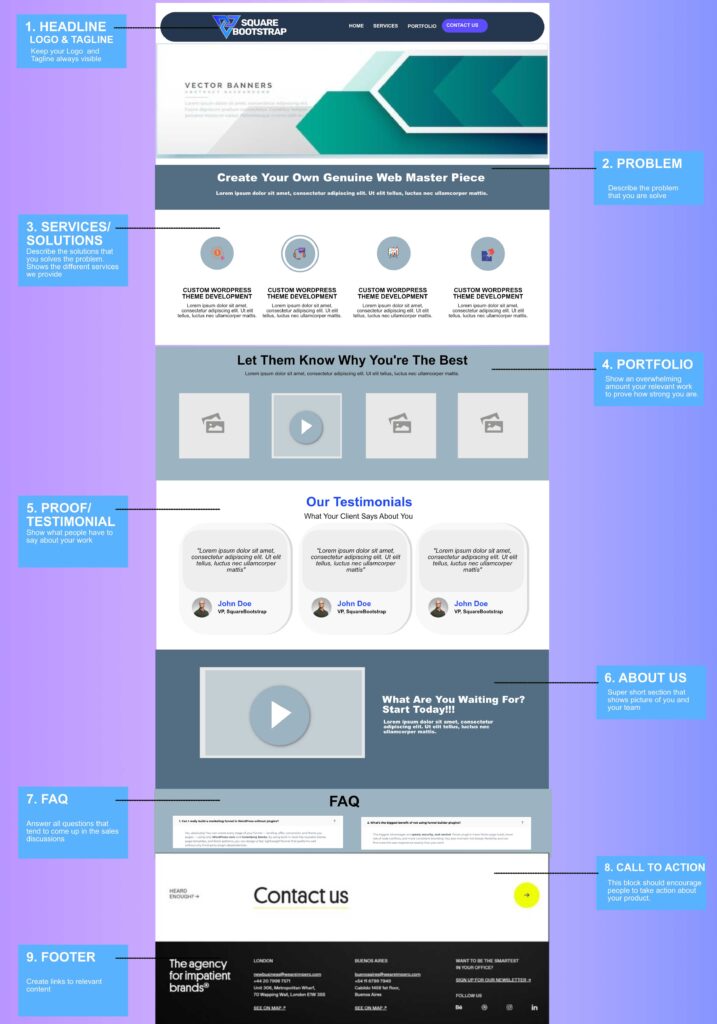
Before building, map out your funnel pages. A simple 4-page funnel works perfectly:
Landing Page → Offer Page → Conversion Page → Thank You Page
| Stage | URL | Objective |
|---|---|---|
| Landing | /landing-page/ | Capture attention and offer value |
| Offer | /value-page/ | Build trust and showcase your offer |
| Conversion | /conversion/ | Collect leads or trigger sales |
| Thank You | /thank-you/ | Confirm the action and offer next steps |
🧭 Tip: Keep your funnel visually consistent — same typography, colors, and button styles across all stages.
🧱 Step 2: Build Your Funnel in WordPress (No Plugins Needed)
🔹 Step 2.1 — Create a Landing Page
Go to Pages → Add New.
Set the template to “Full Width.”
Use Gutenberg’s Cover block for your hero section:
<!– wp:cover {“url”:”https://example.com/hero-bg.jpg”,”dimRatio”:40,”align”:”full”} –>
<div class=”wp-block-cover__inner-container”>
<h1>Boost Your Conversions in 7 Days 🚀</h1>
<p>Join 500+ marketers who improved their funnels with our free guide.</p>
<div class=”wp-block-buttons”>
<div class=”wp-block-button”><a class=”wp-block-button__link” href=”/value-page/”>Get the Free Guide</a></div>
</div>
</div>
<!– /wp:cover –>
Add supporting sections:
Columns block for benefits
Image block for credibility
Buttons for your CTA
⚙️ Pro Tip: Remove menus and footers using a blank template to keep the visitor focused.

🔹 Step 2.2 — Create the Offer Page
Duplicate your landing page and edit the content for your offer or lead magnet.
Example CTA Block:
<!– wp:group {“align”:”wide”} –>
<h2>Ready to Take the Next Step?</h2>
<p>Access our step-by-step WordPress funnel blueprint and start converting smarter.</p>
<div class=”wp-block-buttons”>
<div class=”wp-block-button”><a class=”wp-block-button__link” href=”/conversion/”>Claim My Access</a></div>
</div>
<!– /wp:group –>
💬 Tip: Add a Toggle block for FAQs and a Quote block for testimonials to strengthen trust.
🔹 Step 2.3 — Add a Conversion Page
You can use a basic HTML form or a checkout link — still plugin-free.
Option A: Email Capture
<form action=”mailto:youremail@example.com” method=”post” enctype=”text/plain”>
<input type=”text” name=”Name” placeholder=”Your Name” required>
<input type=”email” name=”Email” placeholder=”Your Email” required>
<button type=”submit”>Submit</button>
</form>
Option B: Payment Button
<a class=”wp-block-button__link” href=”https://buy.stripe.com/testlink123″>Complete Purchase</a>
🧩 Note: Use external tools (Stripe, Gumroad, PayPal) via direct links if needed — still plugin-free.
🔹 Step 2.4 — Create a Thank You Page
<!– wp:group {“align”:”wide”} –>
<h1>🎉 You’re In!</h1>
<p>Thank you for signing up. Check your inbox for your download link.</p>
<div class=”wp-block-buttons”>
<div class=”wp-block-button”><a class=”wp-block-button__link” href=”/blog/”>Read More WordPress Tips →</a></div>
</div>
<!– /wp:group –>
🧠 Pro Tip: Add a short upsell — link to your <a href=”/wordpress-development-services/”>WordPress Development Services</a> page for an upgrade or consultation.
📊 Step 3: Add Tracking and Analytics (No Plugins Required)
Option 1 – Customizer → Additional Scripts
<script async src=”https://www.googletagmanager.com/gtag/js?id=G-XXXXXXX”></script>
<script>
window.dataLayer = window.dataLayer || [];
function gtag(){dataLayer.push(arguments);}
gtag(‘js’, new Date());
gtag(‘config’, ‘G-XXXXXXX’);
</script>
Option 2 – Add via functions.php
add_action(‘wp_head’, function() {
?>
<script>/* Your tracking code here */</script>
<?php
});
📈 Tip: Use UTM tags in your links (e.g., ?utm_source=facebook&utm_campaign=funnel) to track traffic in Google Analytics.
🧠 Step 4: Optimize and Scale
Use Reusable Blocks for CTAs.
Create dynamic sections with Query Loop blocks.
Add conditional code in
functions.php:
if (is_page(‘conversion’)) {
// Conversion tracking here
}
Duplicate pages for manual A/B testing using different CTAs.
⚡ Pro Insight: The fewer elements your visitor sees, the faster they decide. Keep one CTA per page.
💡 Quick Funnel Overview
Landing Page → Offer Page → Conversion Page → Thank You Page
| Funnel Step | Goal |
|---|---|
| Landing | Grab attention |
| Offer | Build interest |
| Conversion | Capture lead/sale |
| Thank You | Confirm + Upsell |
🏁 Conclusion
You don’t need expensive funnel builders or countless plugins to build a marketing funnel in WordPress. With Gutenberg, block patterns, and smart linking, you can create a fast, lightweight funnel that converts — all using native WordPress tools.
🚀 Want a done-for-you marketing funnel setup?
Our WordPress Funnel Design Service can help you plan, design, and launch a custom funnel built for speed and results.
🙋♀️ Frequently Asked Questions (FAQ)
Yes, absolutely! You can create every stage of your funnel — landing, offer, conversion, and thank-you pages — using only WordPress core and Gutenberg blocks. By using built-in tools like reusable blocks, page templates, and block patterns, you can design a fast, lightweight funnel that performs well without any third-party plugin dependencies.
The biggest advantages are speed, security, and control. Fewer plugins mean faster page loads, lower risk of code conflicts, and more consistent branding. You also maintain full design flexibility and can fine-tune the user experience exactly how you want.
You can use a simple HTML form that sends submissions to your email address (mailto:) or connect directly to external tools like Google Forms, Tally, or Typeform using embed codes. These methods keep your site light and avoid plugin bloat while still collecting valuable leads.
racking conversions is easy using Google Analytics or Meta Pixel code added via the Customizer or your theme’s functions.php. You can also use UTM parameters in your funnel links (e.g., ?utm_source=facebook&utm_campaign=funnel) to measure results without extra plugins.
Yes — although this guide focuses on Gutenberg (Block Editor), you can apply the same funnel flow in Elementor, Bricks, or Breakdance. Just make sure to use minimal widgets and inline links for fast performance and better conversions.
This no-plugin funnel method works perfectly for:
Freelancers & agencies promoting services
Coaches offering lead magnets or webinars
Small eCommerce stores promoting one-time offers
Bloggers growing their newsletter list
Basically, anyone who needs a simple, high-performing lead funnel without technical overhead.
Just duplicate your funnel pages manually and change one element (like CTA text or color). Then drive traffic equally to both URLs using custom UTM links or Google Optimize. This “manual A/B testing” method works fine for lean setups.
Yes — building natively with WordPress blocks ensures clean code and minimal JavaScript. This helps improve Core Web Vitals, page load speed, and overall SEO ranking. Plus, you can still use your SEO plugin (like Yoast or Rank Math) to handle meta titles and structured data.
You can easily extend your funnel by adding automation tools later — such as FluentCRM, MailPoet, or ConvertKit. Start plugin-free for speed, and integrate tools as your funnel performance grows.
Yes! Our team at Your Agency Name specializes in building custom, plugin-free marketing funnels optimized for conversions, performance, and SEO.
🚀 Get a free funnel audit → Book a Consultation
